Heading Interpolation
Heading interpolation defines how your robot rotates as it moves along a path. Without it, your robot wouldn’t have a defined heading along any point in the path, and this would make it both inpossible to follow, and extremely inefficient. Apex Pathing provides many different heading interpolation styles to choose from so you can customize your robot’s movement to your liking for almost any autonomous scenario.
Coming soon: The Apex Pathing visualizer can compare the efficiency of different heading interpolation styles.
Defining a path’s interpolation style
There are two different heading interpolation style enums depeneding on the type of drivetrain you have.
If your paths use the HolonomicPathBuilder, you should use the HolonomicInterpolationStyle enum.
If your paths use the TankPathBuilder, you should use the TankInterpolationStyle enum.
Both of the path builders have an interpolateWith() method that takes in an instance of the appropriate
interpolation style enum. The following list has examples of how to use each type.
The pose object used in the examples below is an instance of the
Pose Builder class. An equivalent pose builder using inches and degrees
would look like PoseFactory pose = new PoseFactory(DistUnit.IN, AngleUnit.DEG);.
Tangent Forward
Tangent forward interpolation always faces the robot in the forward direction of the path (a.k.a. tangential to the path).
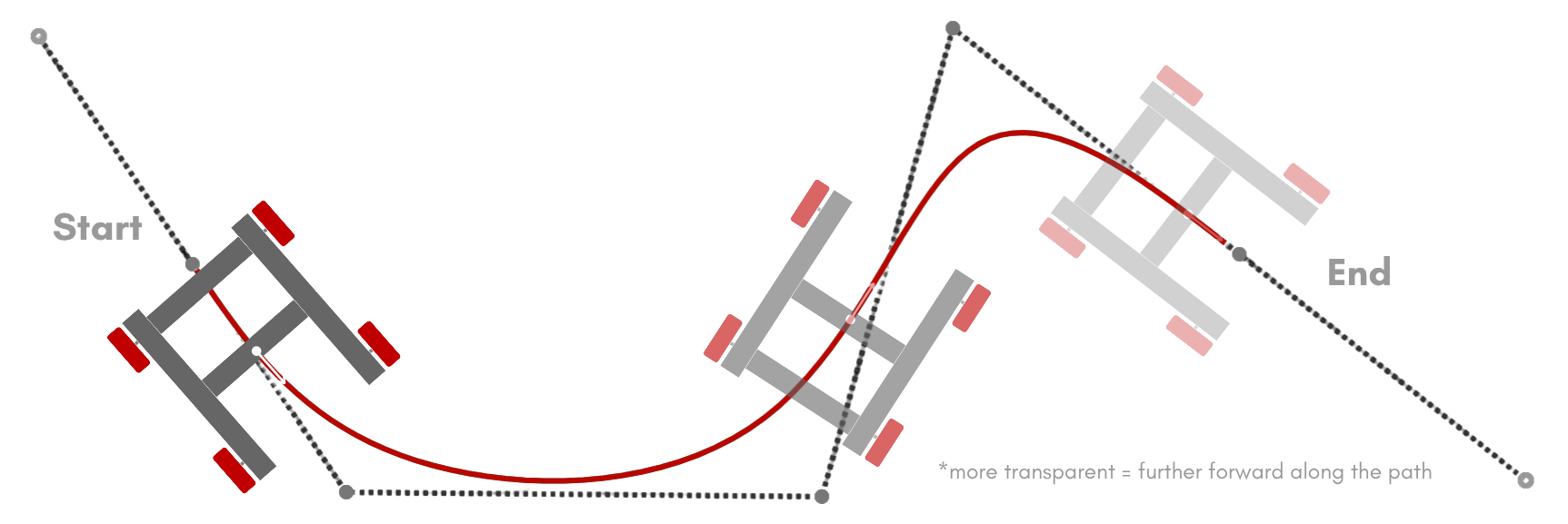
Tangent forward interpolation is the default for TankPathBuilder.
If you do not call the interpolateWith() method, this style will be used.
This style is supported by both the HolonomicPathBuilder and TankPathBuilder classes.
Here is an example using the path shown in the image above.
path = builder.path( // No pose headings are needed for tangent interpolation styles
            pose.of(-45, 0),
            pose.of(-30, -20),
            pose.of(10, -20),
            pose.of(20, 20),
            pose.of(45, 0)
    )
    .interpolateWith(HolonomicInterpolationStyle.TANGENT_FORWARD)
    //.interpolateWith(TankInterpolationStyle.TANGENT_FORWARD) // For TankPathBuilder
    .profiledBuild();
Tangent Backward
Tangent backward interpolation always faces the robot in the backward direction of the path (a.k.a. reverse tangential to the path).
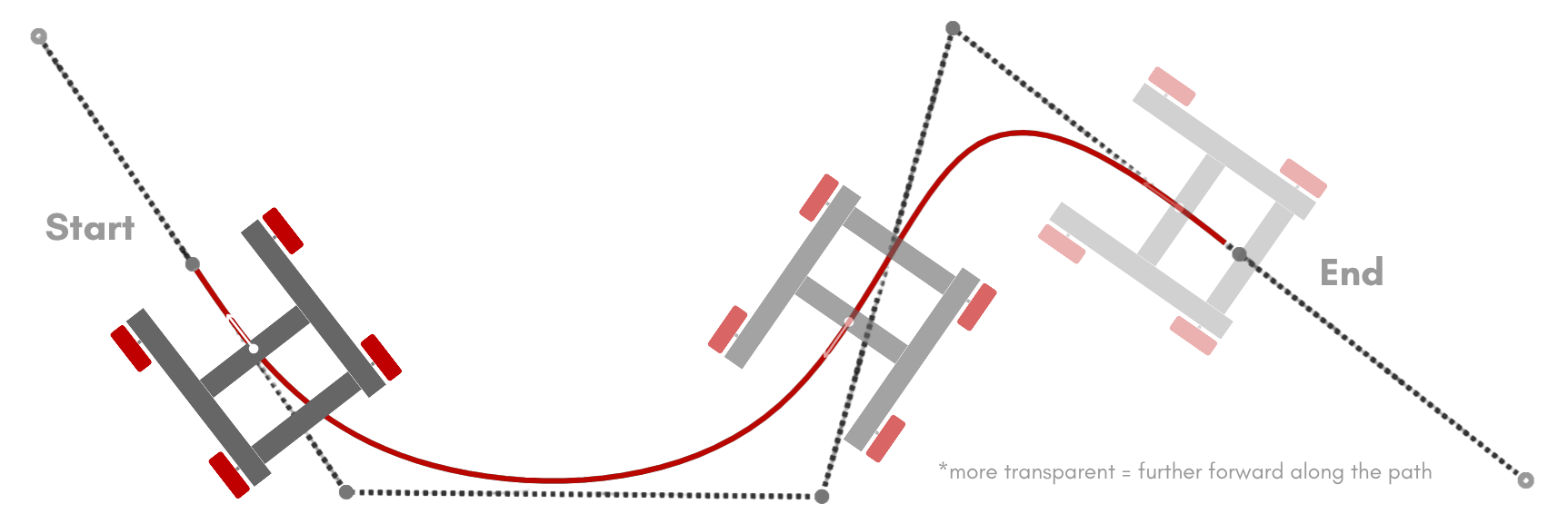
This style is supported by both the HolonomicPathBuilder and TankPathBuilder classes.
Here is an example using the path shown in the image above.
path = builder.path( // No pose headings are needed for tangent interpolation styles
            pose.of(-45, 0),
            pose.of(-30, -20),
            pose.of(10, -20),
            pose.of(20, 20),
            pose.of(45, 0)
    )
    .interpolateWith(HolonomicInterpolationStyle.TANGENT_BACKWARD)
    //.interpolateWith(TankInterpolationStyle.TANGENT_BACKWARD) // For TankPathBuilder
    .profiledBuild();
Tangent Optimal
Tangent optimal interpolation will use either tangent forward or tangent backward interpolation depending on which one requires the least amount of rotation (which is generally the most efficient).
For example, if the robot is facing closer to the tangent forward direction of the path, it will use tangent forward interpolation.
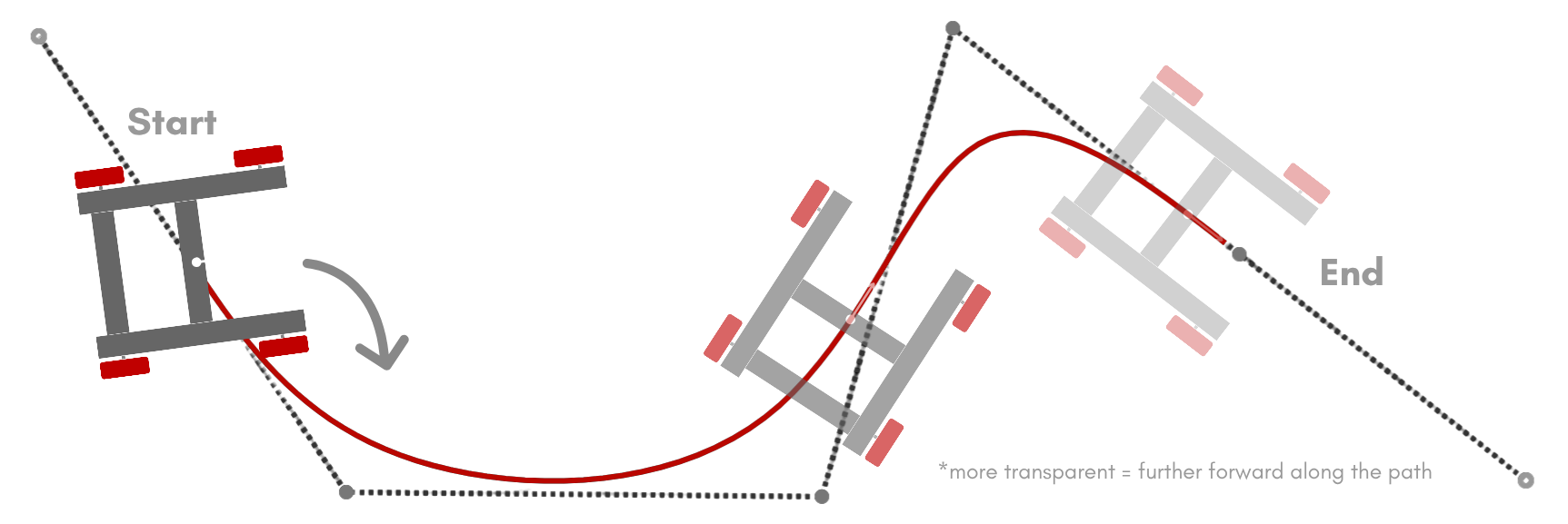
The opposite is true as well, if the robot is facing closer to the tangent backward direction of the path, it will use tangent backward interpolation.
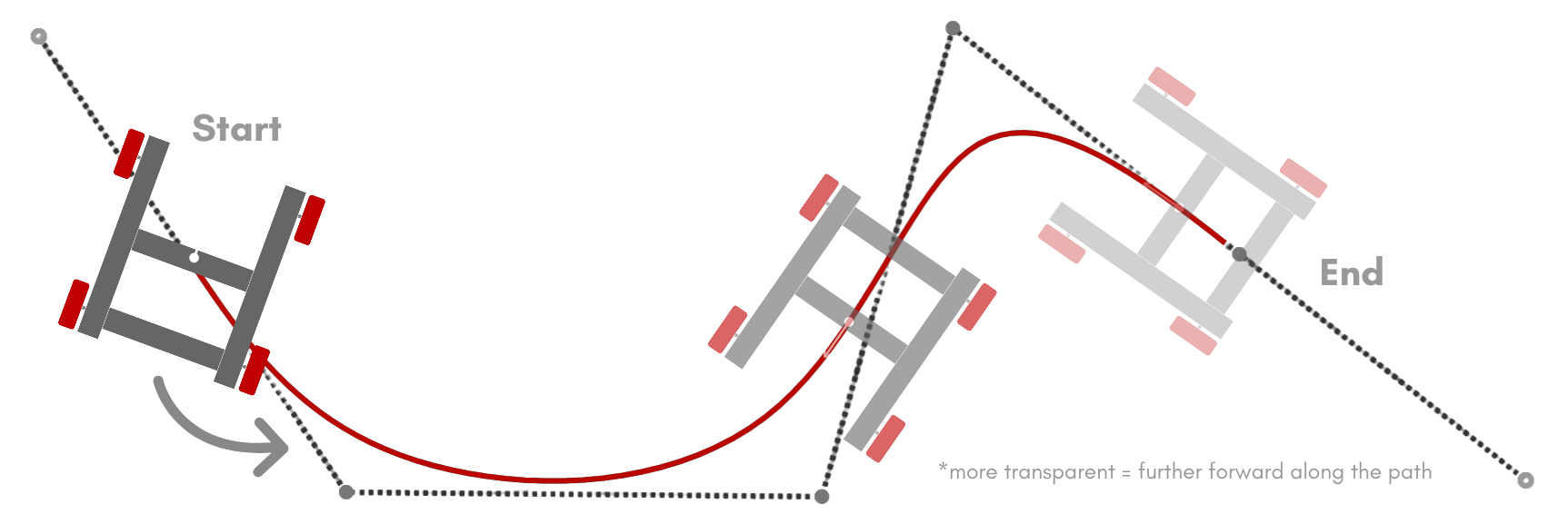
This style is supported by both the HolonomicPathBuilder and TankPathBuilder classes.
Here is an example using the path shown in the image above.
path = builder.path( // No pose headings are needed for tangent interpolation styles
            pose.of(-45, 0),
            pose.of(-30, -20),
            pose.of(10, -20),
            pose.of(20, 20),
            pose.of(45, 0)
    )
    .interpolateWith(HolonomicInterpolationStyle.TANGENT_OPTIMAL)
    //.interpolateWith(TankInterpolationStyle.TANGENT_OPTIMAL) // For TankPathBuilder
    .profiledBuild();
The following interpolation styles are only supported by holonomic drivetrains using the
HolonomicPathBuilder. Tank drivetrain cannot use these styles because they require
the robot to have strafing capabilities.
Tangent Custom
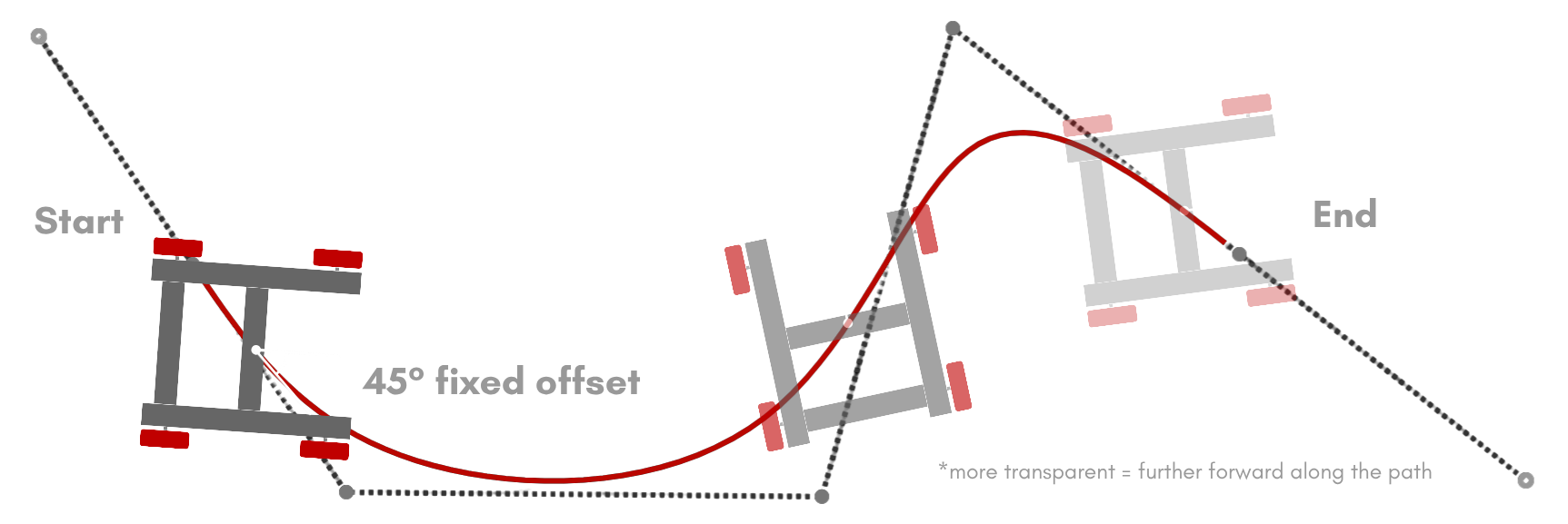
Tangent custom interpolation allows you to define a fixed angle offset from the tangent of the path. The robot will use tangent forward interpolation with this fixed offset. The example below shows an angle offset of 45 degrees.
This style is only supported by the HolonomicPathBuilder class.
Here is an example using the path shown in the image above.
path = builder.path( // No pose headings are needed for tangent interpolation styles
            pose.of(-45, 0),
            pose.of(-30, -20),
            pose.of(10, -20),
            pose.of(20, 20),
            pose.of(45, 0)
    )
    .interpolateWith(HolonomicInterpolationStyle.TANGENT_OPTIMAL, Angle.fromDeg(45)) // 45 degree offset
    .profiledBuild();
You can learn more about the Angle class on the Angle page.
Smooth Start to End
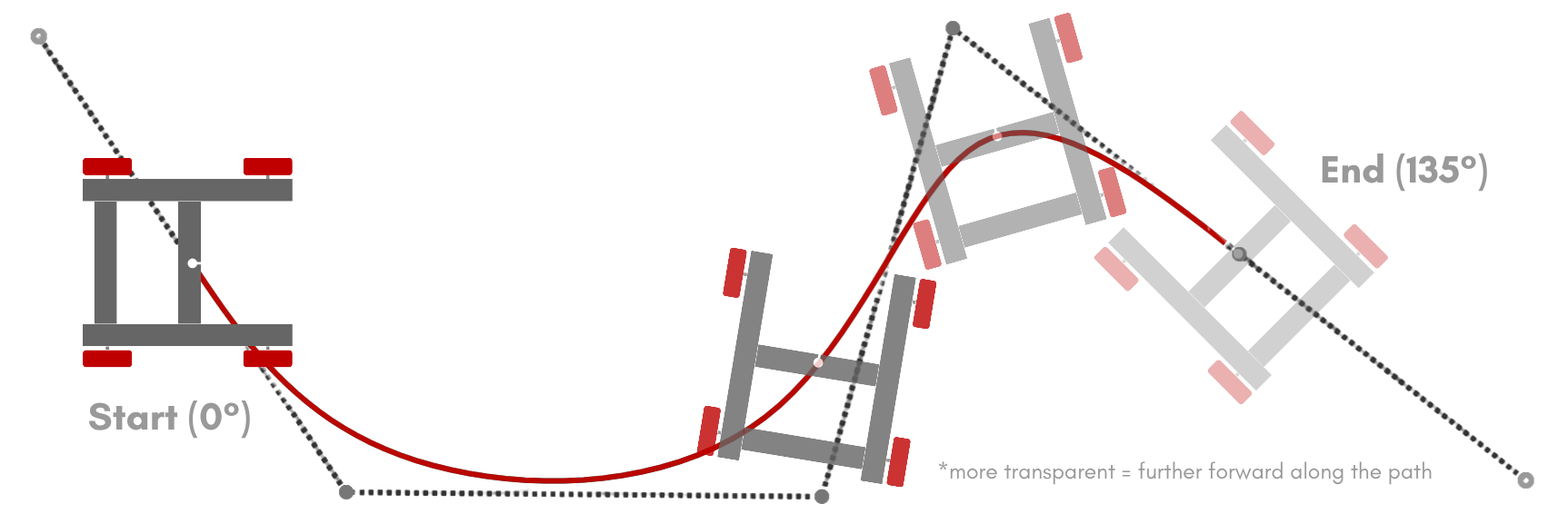
Smooth start to end interpolation will graually rotate the robot from the start heading to the end heading of the path. The rotation speed is based on the path’s length.
Smooth start to end interpolation is the default for HolonomicPathBuilder.
If you do not call the interpolateWith() method, this style will be used.
This style is only supported by the HolonomicPathBuilder class.
Here is an example using the path shown in the image above.
path = builder.path(
            pose.of(-45, 0, 0), // Start heading is 0 degrees
            pose.of(-30, -20),
            pose.of(10, -20),
            pose.of(20, 20),
            pose.of(45, 0, 135) // End heading is 135 degrees
    )
    .interpolateWith(HolonomicInterpolationStyle.SMOOTH_START_TO_END)
    .profiledBuild();
Constant Start Heading
Constant start heading interpolation will maintain the start pose’s heading throughout the entire path.

This style is only supported by the HolonomicPathBuilder class.
Here is an example using the path shown in the image above.
path = builder.path(
            pose.of(-45, 0, 0), // Start heading is 0 degrees
            pose.of(-30, -20),
            pose.of(10, -20),
            pose.of(20, 20),
            pose.of(45, 0) // End heading isn't needed for constant start heading interpolation
    )
    .interpolateWith(HolonomicInterpolationStyle.CONSTANT_START_HEADING)
    .profiledBuild();
Constant End Heading
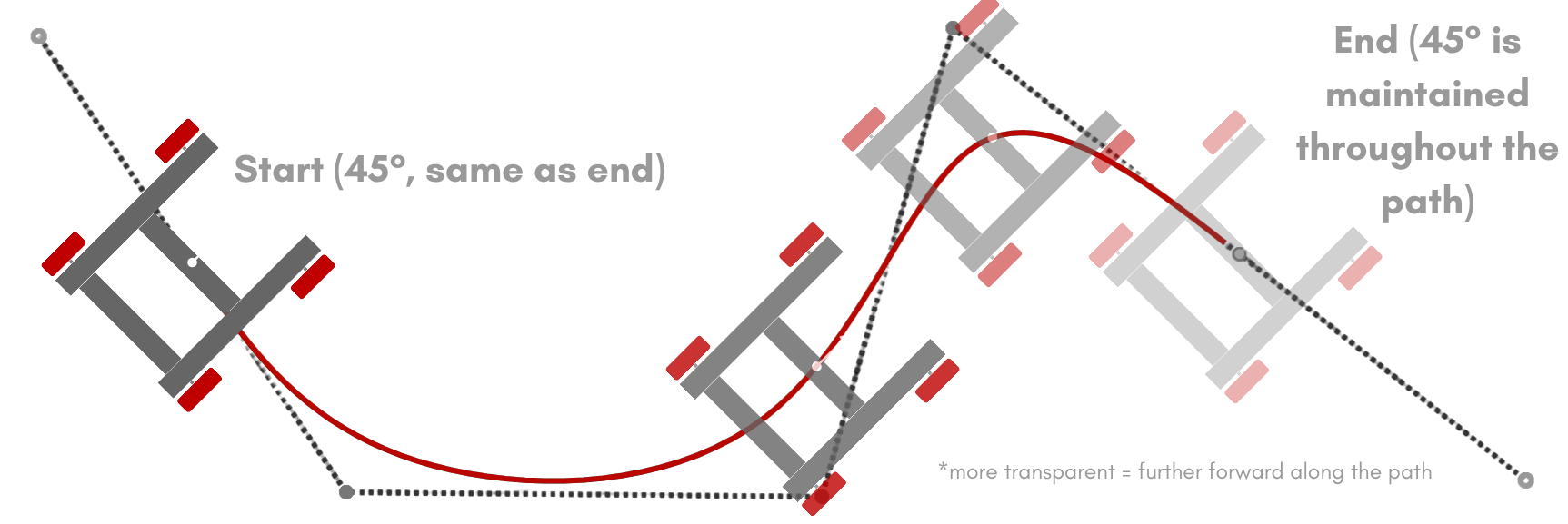
Constant end heading interpolation will maintain the end pose’s heading throughout the entire path.
This style is only supported by the HolonomicPathBuilder class.
Here is an example using the path shown in the image above.
path = builder.path(
            pose.of(-45, 0), // Start heading isn't needed for constant end heading interpolation
            pose.of(-30, -20),
            pose.of(10, -20),
            pose.of(20, 20),
            pose.of(45, 0, 45) // End heading is 45 degrees
    )
    .interpolateWith(HolonomicInterpolationStyle.CONSTANT_END_HEADING)
    .profiledBuild();
Node Based
Node based interpolation allows you to define what heading the robot should be facing at any point on the path. Between these nodes, the robot will use smooth start to end interpolation to rotate between the headings. The example below has three nodes, each has an s value that defines where on the path the node is located and an Angle that defines what heading the robot should be facing at that point. The robot will

This style is only supported by the HolonomicPathBuilder class.
Here is an example using the path shown in the image above.
path = builder.path(
            pose.of(-45, 0, 90), // Start heading is 90 degrees
            pose.of(-30, -20),
            pose.of(10, -20),
            pose.of(20, 20),
            pose.of(45, 0, 180) // End heading is 180 degrees
    )
    .interpolateWith(HolonomicInterpolationStyle.NODE_BASED) // This is optional, using .addheadingNode will automatically switch the interpolation to node based
    .addHeadingNode(0.5, Angle.fromDeg(270)) // Node 1
    .addHeadingNode(0.8, Angle.fromDeg(45)) // Node 2
    // You can add as many nodes as you want
    .profiledBuild();
Facing Pose
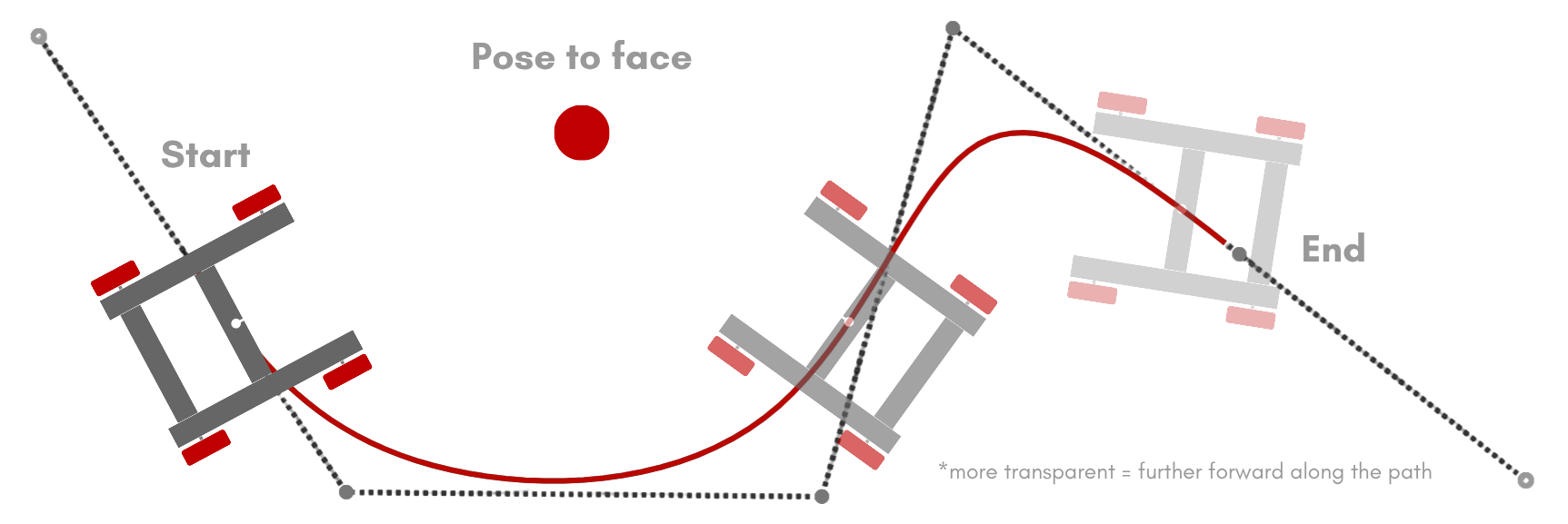
Facing pose interpolation will always face the robot towards a specific pose.
This style is only supported by the HolonomicPathBuilder class.
Here is an example using the path shown in the image above.
path = builder.path( // Start and end headings aren't needed for facing pose interpolation
            pose.of(-45, 0),
            pose.of(-30, -20),
            pose.of(10, -20),
            pose.of(20, 20),
            pose.of(45, 0)
    )
    .interpolateWith(HolonomicInterpolationStyle.FACING_POSE, pose.of(-10, 10))
    .profiledBuild();
If you want to add a fixed angular offset, similar to tangent custom interpolation, you can add that after the pose.
.interpolateWith(HolonomicInterpolationStyle.FACING_POSE, pose.of(-10, 10), Angle.fromDeg(45))